

example1: 平行光
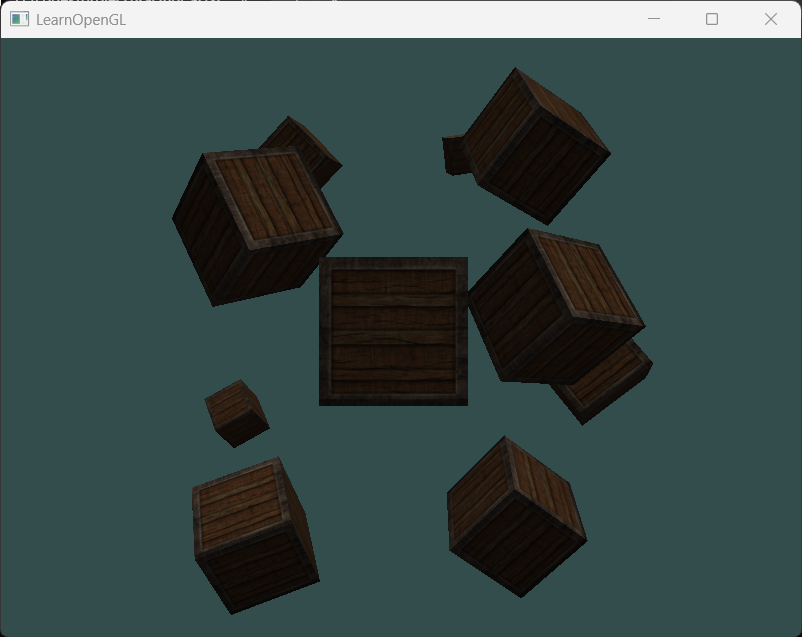
平行光是没有位置只有方向的光,场景中所有物体受到的平行光照的方向都是一样的。所以对光源结构体来说,它不再拥有位置属性,取而代之的是方向属性。但是这个方向是从光源到物体的,而计算光照需要的是物体到光源的,所以需要取反再用于计算光照。此外,在设置平行光方向属性时,需要是从光源到物体的光,几乎总是斜向下的(考虑太阳光),所以三个分量都应该是负的。
在cpp程序中,需要在渲染循环外部设置光照方向的值。在本例中使用十个不同旋转角度、不同位置的箱子搭建场景。画十个不同的箱子需要for循环十次,每次传入不同的平移分量和旋转分量,还需调用十次glDrawArrays,而调用这行语句需要是绘制箱子的所有东西都准备好了,即通常位于渲染循环的后面位置。此外,由于我们在实现仅有平行光的场景,所以渲染循环中不再需要绘制立方体形状的点光源。
//物体的着色器Shader ourShader("src/Shader/vertexShader.txt", "src/Shader/fragmentShader.txt");//光源的着色器//如果共用一个片元着色器,修改物体颜色将会修改光源颜色,这并不是我们想要的Shader lightShader("src/Shader/vertexShader.txt", "src/Shader/lightFragmentShader.txt");
ourShader.use();//设置物体运行时不需要改变的uniform变量值ourShader.setInt("material.diffuse", 0);ourShader.setInt("material.specular", 1);ourShader.setFloat("material.shininess", 64.0f);
ourShader.setVec3("light.ambient", glm::vec3(0.2f));ourShader.setVec3("light.diffuse", glm::vec3(0.5f));ourShader.setVec3("light.specular", glm::vec3(1.0f));ourShader.setVec3("light.direction", glm::vec3(-0.2f, -1.0f, -0.3f));
while (!glfwWindowShouldClose(window)) { float currentFrame = static_cast<float>(glfwGetTime()); deltaTime = currentFrame - lastFrame; lastFrame = currentFrame; processInput(window); glClearColor(0.2f, 0.3f, 0.3f, 1.0f); glClear(GL_COLOR_BUFFER_BIT|GL_DEPTH_BUFFER_BIT);
//绘制物体 ourShader.use(); glBindVertexArray(VAO); glm::mat4 model; ourShader.setMatrix("model", model); glm::mat4 view; view = camera.GetCameraView(); ourShader.setMatrix("view", view); glm::mat4 project; project = glm::perspective(glm::radians(camera.Zoom), (float)SCR_WIDTH / (float)SCR_HEIGHT, 0.1f, 100.0f); ourShader.setMatrix("project", project);
//传递物体运行时需要更新的uniform变量 ourShader.setVec3("viewPos", camera.Position); ourShader.setVec3("light.lightPos", lightPos);
//绘制贴图 glActiveTexture(GL_TEXTURE0); glBindTexture(GL_TEXTURE_2D, diffuseMap);//设置绘制当前物体所需的纹理 glActiveTexture(GL_TEXTURE1); glBindTexture(GL_TEXTURE_2D, specularMap);
for (unsigned int i = 0; i < 10; i++) { model = glm::mat4(1.0); model = glm::translate(model, cubePositions[i]); float angle = 20.0f * i; model = glm::rotate(model, glm::radians(angle), glm::vec3(1.0f, 0.3f, 0.5f)); ourShader.setMatrix("model", model); glDrawArrays(GL_TRIANGLES, 0, 36); }
glfwSwapBuffers(window); glfwPollEvents();}example2: 绘制带有衰减的点光源
点光源是无方向(向四面八方)、有位置的。但之前的实现没有带上衰减,场景中离光源近或者离光源远的物体受到的点光源光照都是一样的,这不真实。本例中实现点光源衰减。观察光源衰减的公式知,求衰减需要额外定义公式中的三个系数,所以在光源结构体中增加这三个系数并在cpp代码中设置。在光照计算中,把光照衰减乘到光源三分量中。
//fragmentShader#version 330 corestruct Material{ sampler2D diffuse; sampler2D specular; float shininess;};struct Light{ vec3 position; float constant; float linear; float quadratic;
vec3 ambient; vec3 diffuse; vec3 specular;};in vec3 worldPos;in vec3 normal;in vec2 Texcoords;uniform Material material;uniform Light light;uniform vec3 viewPos;out vec4 FragColor;void main(){ vec3 ambient = light.ambient*texture(material.diffuse,Texcoords).rgb;
vec3 worldNormal=normalize(normal); vec3 worldLightDir=normalize(light.position-worldPos); float diff=max(dot(worldNormal,worldLightDir),0.0); vec3 diffuse=diff*texture(material.diffuse,Texcoords).rgb*light.diffuse;
vec3 worldViewDir=normalize(viewPos-worldPos); vec3 reflectDir=reflect(-worldLightDir,worldNormal); float spec=pow(max(dot(worldViewDir,reflectDir),0.0),material.shininess); vec3 specular=spec*texture(material.specular,Texcoords).rgb*light.specular;
float distance=length(light.position-worldPos);//使用length计算向量的长度 float atten=(1.0f) / (light.constant+light.linear*distance+light.quadratic*distance*distance); FragColor = vec4((ambient+diffuse+specular)*atten,1.0);}对于光照衰减公式中的三个系数,常数系数永远为1,线性系数和二次系数随着光源传播距离增大而减小。
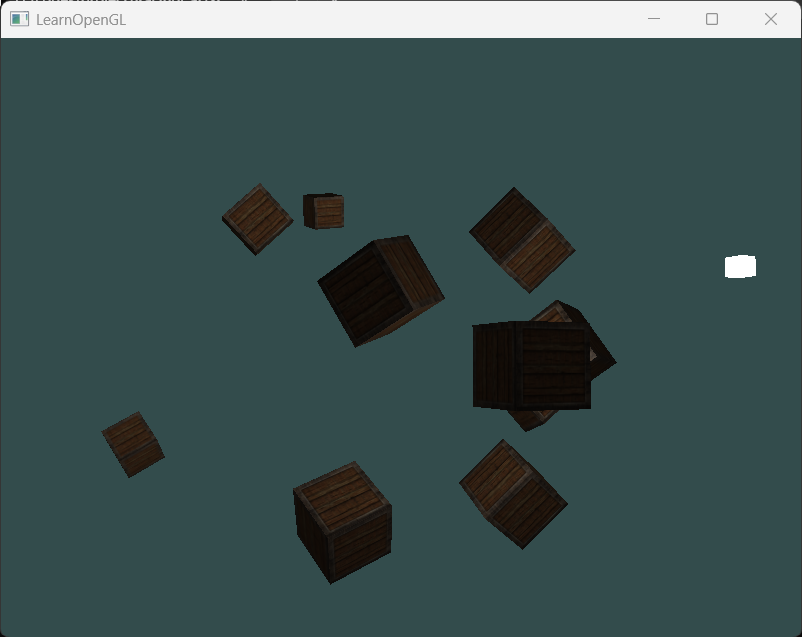
光线传播距离较大时:后排物体也能被照亮:
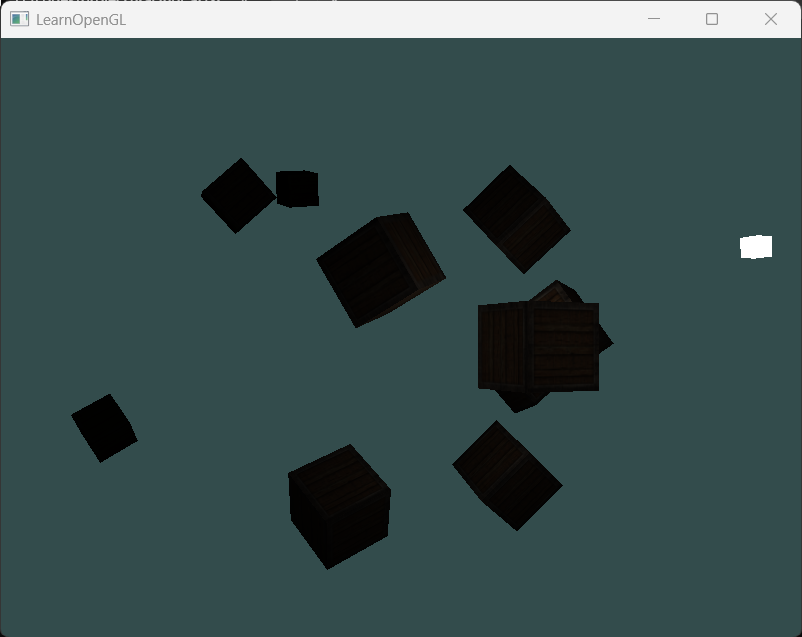
 光线传播距离较小时:几乎整个场景都是黑的:
example3: 聚光灯
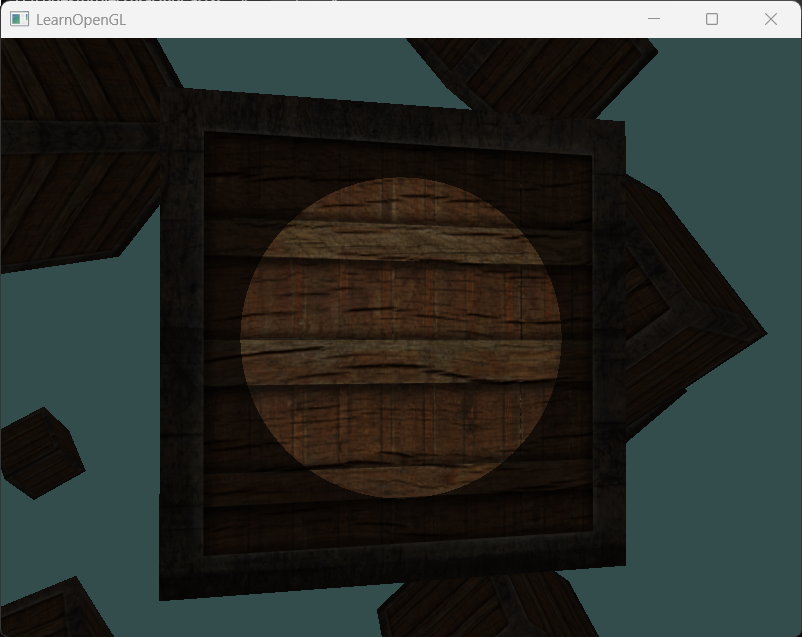
聚光灯是有位置有方向的光源。它靠光源位置、光源方向、切光角定义,在计算光照前,我们需要判断一个片元是否处于聚光灯的锥形光照空间内。这是通过计算光源到片元的方向向量与光源方向的夹角,并与切光角比较实现的。但在实现过程中,由于计算夹角需要计算反余弦值,这是一个比较昂贵且耗时的计算,特别是在片元着色器内,所以只停留在计算完余弦值,然后比较余弦值,进而比较角度值。但使用余弦值需要注意,在半球空间内,也就是这两的夹角在[0,90],余弦值是递减的,所以余弦值的比较结果是角度值比较结果的反转。
此外,由于聚光灯的位置是摄像机位置,方向是摄像机看向,而摄像机是可以通过wasd或鼠标移动的,所以需要把设置这两uniform变量值的逻辑写在渲染循环内部。而且我们不再依赖点光源了,那么绘制点光源的代码就可以删了。
//物体的着色器Shader ourShader("src/Shader/vertexShader.txt", "src/Shader/fragmentShader.txt");//光源的着色器//如果共用一个片元着色器,修改物体颜色将会修改光源颜色,这并不是我们想要的Shader lightShader("src/Shader/vertexShader.txt", "src/Shader/lightFragmentShader.txt");
ourShader.use();//设置物体运行时不需要改变的uniform变量值ourShader.setInt("material.diffuse", 0);ourShader.setInt("material.specular", 1);ourShader.setFloat("material.shininess", 64.0f);
ourShader.setVec3("light.ambient", glm::vec3(0.2f));ourShader.setVec3("light.diffuse", glm::vec3(0.8f));ourShader.setVec3("light.specular", glm::vec3(1.0f));ourShader.setFloat("light.constant", 1.0f);ourShader.setFloat("light.linear", 0.09f);ourShader.setFloat("light.quadratic", 0.32f);
while (!glfwWindowShouldClose(window)) { float currentFrame = static_cast<float>(glfwGetTime()); deltaTime = currentFrame - lastFrame; lastFrame = currentFrame; processInput(window); glClearColor(0.2f, 0.3f, 0.3f, 1.0f); glClear(GL_COLOR_BUFFER_BIT|GL_DEPTH_BUFFER_BIT);
//绘制物体 ourShader.use(); glBindVertexArray(VAO); glm::mat4 model; ourShader.setMatrix("model", model); glm::mat4 view; view = camera.GetCameraView(); ourShader.setMatrix("view", view); glm::mat4 project; project = glm::perspective(glm::radians(camera.Zoom), (float)SCR_WIDTH / (float)SCR_HEIGHT, 0.1f, 100.0f); ourShader.setMatrix("project", project);
//传递物体运行时需要更新的uniform变量 ourShader.setVec3("viewPos", camera.Position); ourShader.setVec3("light.position", camera.Position); ourShader.setVec3("light.direction", camera.Front); ourShader.setFloat("light.cutOff", glm::cos(glm::radians(12.5f)));//传入着色器的切光角是余弦值而非角度值:因为在着色器中计算的是光照向量和光源到片元的方向向量的点积,返回的是余弦值 //不比较两个角度值是因为求角度值需要反余弦,计算昂贵
//绘制贴图 glActiveTexture(GL_TEXTURE0); glBindTexture(GL_TEXTURE_2D, diffuseMap);//设置绘制当前物体所需的纹理 glActiveTexture(GL_TEXTURE1); glBindTexture(GL_TEXTURE_2D, specularMap);
for (unsigned int i = 0; i < 10; i++) { model = glm::mat4(1.0); model = glm::translate(model, cubePositions[i]); float angle = 20.0f * i; model = glm::rotate(model, glm::radians(angle), glm::vec3(1.0f, 0.3f, 0.5f)); ourShader.setMatrix("model", model); glDrawArrays(GL_TRIANGLES, 0, 36); } ``` ```glsl //fragmentShader #version 330 corestruct Material{ sampler2D diffuse; sampler2D specular; float shininess;};struct Light{ vec3 position; vec3 direction; float cutOff; float constant; float linear; float quadratic;
vec3 ambient; vec3 diffuse; vec3 specular;};in vec3 worldPos;in vec3 normal;in vec2 Texcoords;uniform Material material;uniform Light light;uniform vec3 viewPos;out vec4 FragColor;void main(){ vec3 ambient = light.ambient*texture(material.diffuse,Texcoords).rgb; vec3 worldNormal=normalize(normal); vec3 worldLightDir=normalize(light.position-worldPos);
float theta=dot(worldLightDir,normalize(-light.direction));//worldLightDir是从片元到光源,light.direction是从光源出发的方向向量,二者计算点积时应该统一方向 if(theta > light.cutOff){ //执行正常光照计算 float diff=max(dot(worldNormal,worldLightDir),0.0); vec3 diffuse=diff*texture(material.diffuse,Texcoords).rgb*light.diffuse;
vec3 worldViewDir=normalize(viewPos-worldPos); vec3 reflectDir=reflect(-worldLightDir,worldNormal); float spec=pow(max(dot(worldViewDir,reflectDir),0.0),material.shininess); vec3 specular=spec*texture(material.specular,Texcoords).rgb*light.specular;
float distance = length(light.position-worldPos); float atten = 1.0 / (light.constant + light.linear*distance + light.quadratic*distance*distance); FragColor = vec4(ambient+(diffuse+specular)*atten,1.0); }else{ //只受环境光影响,不至于过于黑 FragColor = vec4(ambient,1.0); }}看起来很奇怪,因为聚光灯边缘有一圈硬边。当一个片段遇到聚光圆锥的边缘时,它会完全变暗,没有一点平滑的过渡。一个真实的聚光将会在边缘处逐渐减少亮度。
example4: 实现聚光灯的半径方向衰减
在上述实验渲染效果中,我们发现聚光灯边缘部分过渡过于强硬,导致看起来不真实。实际上,边缘应该有一个由亮到暗的过渡效果。因此为聚光灯增加外锥体切光角的定义,光源到片元的方向向量和光源的方向向量的夹角在外锥体切光角以外,则片元完全不在聚光灯光照空间内,仅有环境光;在内锥体切光角以内,则片元完全在聚光灯光照空间内,则有完整光照计算;在二者之间,根据角度差值插值光照强度,越靠近外锥体切光角则越暗,反之,越亮。
实现过程中,因为光照强度是0-1,任何大于1的强度都会钳制到1,任何小于0的强度都会钳制到0,所以可以借助clamp函数实现。此外,依旧使用余弦值代替角度。
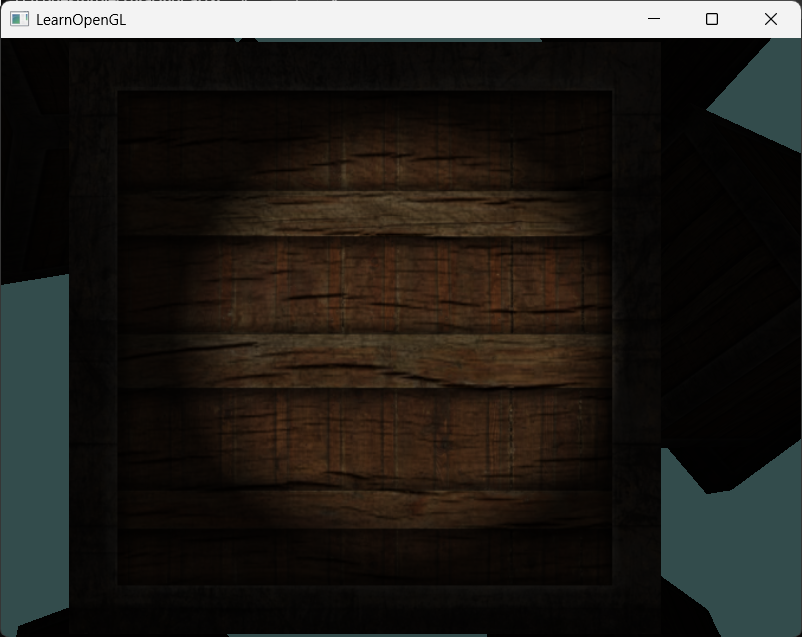
//fragmentShader#version 330 corestruct Material{ sampler2D diffuse; sampler2D specular; float shininess;};struct Light{ vec3 position; vec3 direction; float cutOff; float outerCutOff; float constant; float linear; float quadratic;
vec3 ambient; vec3 diffuse; vec3 specular;};in vec3 worldPos;in vec3 normal;in vec2 Texcoords;uniform Material material;uniform Light light;uniform vec3 viewPos;out vec4 FragColor;void main(){ vec3 ambient = light.ambient*texture(material.diffuse,Texcoords).rgb; vec3 worldNormal=normalize(normal); vec3 worldLightDir=normalize(light.position-worldPos);
float theta=dot(worldLightDir,normalize(-light.direction));//worldLightDir是从片元到光源,light.direction是从光源出发的方向向量,二者计算点积时应该统一方向 float epsilon=light.cutOff-light.outerCutOff; float intensity=clamp((theta-light.outerCutOff)/epsilon,0.0,1.0); float diff=max(dot(worldNormal,worldLightDir),0.0); vec3 diffuse=diff*texture(material.diffuse,Texcoords).rgb*light.diffuse;
vec3 worldViewDir=normalize(viewPos-worldPos); vec3 reflectDir=reflect(-worldLightDir,worldNormal); float spec=pow(max(dot(worldViewDir,reflectDir),0.0),material.shininess); vec3 specular=spec*texture(material.specular,Texcoords).rgb*light.specular;
float distance = length(light.position-worldPos); float atten = 1.0 / (light.constant + light.linear*distance + light.quadratic*distance*distance); FragColor = vec4((ambient+(diffuse+specular)*intensity)*atten,1.0);}