

帧缓冲基本概念
帧缓冲(Framebuffer):颜色缓冲、深度缓冲、模板缓冲的统称。 OpenGL 默认自带窗口对应的默认帧缓冲,所有常规渲染最终输出到默认帧缓冲,展示在窗口屏幕上。
自定义帧缓冲与离屏渲染
- 开发者手动创建的 FBO 为自定义帧缓冲,不属于系统默认窗口帧缓冲。
- 渲染到自定义帧缓冲时,渲染结果不会直接输出到窗口屏幕,对窗口视觉无影响。
- 这种渲染到自定义缓冲、而非屏幕的渲染方式,称为离屏渲染。
FBO 与附件
FBO 是容器(画板),附件是真实存储数据的画布。
- FBO 本身不存储任何像素数据,仅负责管理、挂载各类缓冲附件。
- 只有为 FBO 创建附件、并分配显存内存后,FBO 才算真正可用,能够接收渲染数据。 渲染数据归属规则:
- 颜色附件:接收片元着色器输出的颜色数据
- 深度/模板附件:接收深度测试、模板测试的运算数据
两类帧缓冲附件
纹理附件(Texture Attachment)
将一张 2D 纹理挂载到 FBO 附件插槽,作为像素缓冲区。 核心特性:可读、可写、可采样
- 可作为渲染目标,接收 GPU 渲染像素
- 可像普通纹理一样,在着色器中通过 UV 坐标采样复用
渲染缓冲对象(Renderbuffer)
专属帧缓冲数据容器,为 GPU 优化的离屏缓冲。 核心特性:可读写、不可采样
- 支持将缓冲内像素整块拷贝给 CPU(可读)
- 不属于标准纹理,无纹理采样硬件状态,无法在着色器中通过
texture()函数 UV 随机采样
纹理附件的创建和挂载
纹理创建
帧缓冲纹理附件的创建逻辑与普通纹理基本一致,仅存在少量区别:
- 纹理宽高设置为目标渲染尺寸(可与屏幕大小不同)
- 纹理初始数据置为 NULL(由 GPU 渲染填充)
- 无需关注纹理环绕方式、多级渐远纹理参数
纹理挂载
glFramebufferTexture2D(GL_FRAMEBUFFER, attachment, GL_TEXTURE_2D, texture, 0);参数解析:
-
第二个参数
attachment:附件类型GL_COLOR_ATTACHMENTx:颜色纹理附件GL_DEPTH_ATTACHMENT:深度纹理附件GL_STENCIL_ATTACHMENT:模板纹理附件
-
倒数第二个参数:绑定的纹理对象
-
最后一个参数:多级渐远纹理层级,固定填 0
不同类型的纹理附件
深度纹理附件
- 格式:
GL_DEPTH_COMPONENT - 内部格式:
GL_DEPTH_COMPONENT16/GL_DEPTH_COMPONENT24/GL_DEPTH_COMPONENT32 - 数据类型:
GL_UNSIGNED_INT
模板纹理附件
- 格式:
GL_STENCIL_INDEX - 内部格式:
GL_STENCIL_INDEX8(通用8位精度) - 数据类型:
GL_UNSIGNED_BYTE
深度+模板 复合纹理附件
- 格式:
GL_DEPTH_STENCIL - 内部格式:
GL_DEPTH24_STENCIL8(最常用组合格式) - 数据类型:
GL_UNSIGNED_INT_24_8
渲染缓冲对象(RBO)核心操作指令
// 1. 创建渲染缓冲对象glGenRenderbuffers(1, &rbo);// 2. 绑定渲染缓冲glBindRenderbuffer(GL_RENDERBUFFER, rbo);// 3. 分配显存内存(指定格式、宽高)glRenderbufferStorage(GL_RENDERBUFFER, GL_DEPTH24_STENCIL8, SCR_WIDTH, SCR_HEIGHT);// 4. 将渲染缓冲附加到帧缓冲glFramebufferRenderbuffer(GL_FRAMEBUFFER, GL_DEPTH_STENCIL_ATTACHMENT, GL_RENDERBUFFER, rbo);FBO 渲染输出
绑定 FBO 后,所有后续渲染指令的输出目的地全部转移至当前绑定的自定义帧缓冲,不再输出到屏幕。
若需要渲染到非屏幕尺寸的纹理附件(放大/缩小画面):
必须在渲染到自定义 FBO 之前 调用 glViewport,将参数设置为纹理的宽高,否则画面会出现渲染不全、拉伸、局部空白等异常问题。
屏幕纹理采样
坐标规则
GPU 渲染的屏幕颜色纹理 textureColorbuffer 遵循标准纹理规则:纹理原点在左下角。因此定义屏幕四边形顶点、片元着色器采样 UV 时,必须严格遵循该坐标系。
边缘条纹问题与解决方案
对屏幕纹理边缘进行模糊、卷积采样时,需要采样中心像素周边 8 个邻域像素,边缘位置会采样到纹理外部区域。
纹理默认环绕模式为GL_REPEAT,会复用屏幕另一侧的像素数据,导致屏幕边缘出现异常条纹、杂色。
解决方案:将屏幕帧缓冲纹理的环绕方式统一设置为 GL_CLAMP_TO_EDGE,边缘超出部分复用边缘像素,彻底消除采样异常。
example1: 使用自定义帧缓冲
通过自定义帧缓冲完成一个简单的屏幕后处理(简单到屏幕后处理仅是采样颜色缓冲然后直接输出,没有做任何其他操作)。
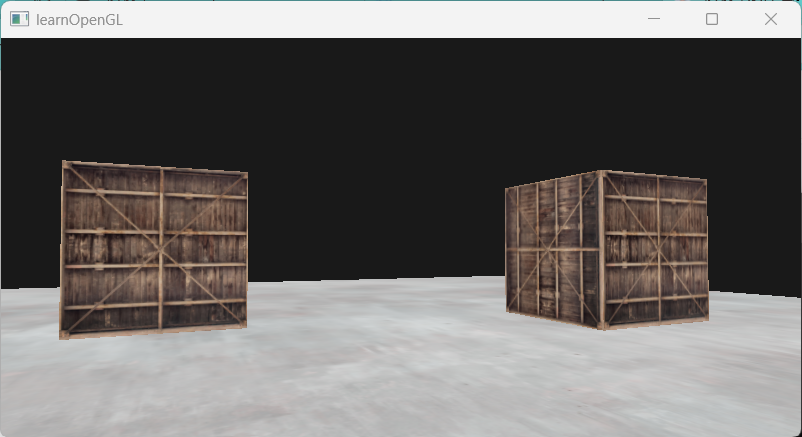
#define STB_IMAGE_IMPLEMENTATION#include <glad/glad.h>#include <GLFW/glfw3.h>#include <stb_image.h>
#include <glm/glm.hpp>#include <glm/gtc/matrix_transform.hpp>#include <glm/gtc/type_ptr.hpp>
#include <myShader.h>#include <myCamera.h>#include <Model.h>
#include <iostream>
const unsigned int SCR_WIDTH = 800;const unsigned int SCR_HEIGHT = 400;
Camera camera(glm::vec3(0.0f, 0.0f, 3.0f));float lastX = (float)SCR_WIDTH / 2.0;float lastY = (float)SCR_HEIGHT / 2.0;bool firstCamera = true;
float deltaTime = 0.0f;float lastFrame = 0.0f;
void framebuffer_size_callback(GLFWwindow* window, int width, int height) { glViewport(0, 0, width, height);}void processInput(GLFWwindow* window) { if (glfwGetKey(window, GLFW_KEY_ESCAPE)) { glfwSetWindowShouldClose(window, true); } if (glfwGetKey(window, GLFW_KEY_W)) { camera.ProcessKeyboard(FORWARD, deltaTime); } if (glfwGetKey(window, GLFW_KEY_S)) { camera.ProcessKeyboard(BACKWARD, deltaTime); } if (glfwGetKey(window, GLFW_KEY_A)) { camera.ProcessKeyboard(LEFT, deltaTime); } if (glfwGetKey(window, GLFW_KEY_D)) { camera.ProcessKeyboard(RIGHT, deltaTime); }}void processMovement(GLFWwindow* window, double xpos, double ypos) { if (firstCamera) { lastX = static_cast<float>(xpos); lastY = static_cast<float>(ypos); firstCamera = false; } float xoffset = static_cast<float>(xpos) - lastX; float yoffset = lastY - static_cast<float>(ypos); lastX = static_cast<float>(xpos); lastY = static_cast<float>(ypos); camera.ProcessMouseMovement(xoffset, yoffset);}void processScroll(GLFWwindow* window, double xoffset, double yoffset) { camera.ProcessScroll(static_cast<float>(yoffset));}unsigned int loadTexture(const char* path) { unsigned int texture; glGenTextures(1, &texture);
int width, height, nrChannels; unsigned char* data = stbi_load(path, &width, &height, &nrChannels, 0); if (data) { GLenum format; if (nrChannels == 1) { format = GL_RED; } else if (nrChannels == 3) { format = GL_RGB; } else if (nrChannels == 4) { format = GL_RGBA; } glBindTexture(GL_TEXTURE_2D, texture);
glTexImage2D(GL_TEXTURE_2D, 0, format, width, height, 0, format, GL_UNSIGNED_BYTE, data); glGenerateMipmap(GL_TEXTURE_2D);
glTexParameteri(GL_TEXTURE_2D, GL_TEXTURE_WRAP_S, GL_REPEAT); glTexParameteri(GL_TEXTURE_2D, GL_TEXTURE_WRAP_T, GL_REPEAT); glTexParameteri(GL_TEXTURE_2D, GL_TEXTURE_MIN_FILTER, GL_LINEAR_MIPMAP_LINEAR); glTexParameteri(GL_TEXTURE_2D, GL_TEXTURE_MAG_FILTER, GL_LINEAR); } else { cout << "failed to load tetxure" << endl; } stbi_image_free(data);
return texture;}int main() { glfwInit(); glfwWindowHint(GLFW_CONTEXT_VERSION_MAJOR, 3); glfwWindowHint(GLFW_CONTEXT_VERSION_MINOR, 3); glfwWindowHint(GLFW_OPENGL_PROFILE, GLFW_OPENGL_CORE_PROFILE);
GLFWwindow* window = glfwCreateWindow(SCR_WIDTH, SCR_HEIGHT, "learnOpenGL", NULL, NULL);
if (window == NULL) { cout << "failed to create GLFW window" << endl; glfwTerminate(); return -1; }
glfwMakeContextCurrent(window); glfwSetFramebufferSizeCallback(window, framebuffer_size_callback); glfwSetCursorPosCallback(window, processMovement); glfwSetScrollCallback(window, processScroll);
glfwSetInputMode(window, GLFW_CURSOR, GLFW_CURSOR_DISABLED);
if (!gladLoadGLLoader(GLADloadproc(glfwGetProcAddress))) { cout << "failed to initialize glad" << endl; glfwTerminate(); return -1; }
stbi_set_flip_vertically_on_load(true);
glEnable(GL_DEPTH_TEST);
//场景渲染着色器,需要模型/视图/投影矩阵,纹理采样、光照逻辑 Shader shader("src/Shader/vertexShader.txt", "src/Shader/fragmentShader.txt"); //屏幕后处理着色器,纹理采样、后处理 Shader screenShader("src/Shader/screenVertexShader.txt", "src/Shader/screenFragmentShader.txt");
float cubeVertices[] = { // Back face -0.5f, -0.5f, -0.5f, 0.0f, 0.0f, // Bottom-left 0.5f, 0.5f, -0.5f, 1.0f, 1.0f, // top-right -0.5f, 0.5f, -0.5f, 0.0f, 1.0f, // top-left 0.5f, -0.5f, -0.5f, 1.0f, 0.0f, // bottom-right 0.5f, 0.5f, -0.5f, 1.0f, 1.0f, // top-right -0.5f, -0.5f, -0.5f, 0.0f, 0.0f, // bottom-left // Front face -0.5f, -0.5f, 0.5f, 0.0f, 0.0f, // bottom-left 0.5f, 0.5f, 0.5f, 1.0f, 1.0f, // top-right 0.5f, -0.5f, 0.5f, 1.0f, 0.0f, // bottom-right 0.5f, 0.5f, 0.5f, 1.0f, 1.0f, // top-right -0.5f, -0.5f, 0.5f, 0.0f, 0.0f, // bottom-left -0.5f, 0.5f, 0.5f, 0.0f, 1.0f, // top-left // Left face -0.5f, 0.5f, 0.5f, 1.0f, 0.0f, // top-right -0.5f, -0.5f, -0.5f, 0.0f, 1.0f, // bottom-left -0.5f, 0.5f, -0.5f, 1.0f, 1.0f, // top-left -0.5f, -0.5f, -0.5f, 0.0f, 1.0f, // bottom-left -0.5f, 0.5f, 0.5f, 1.0f, 0.0f, // top-right -0.5f, -0.5f, 0.5f, 0.0f, 0.0f, // bottom-right // Right face 0.5f, 0.5f, 0.5f, 1.0f, 0.0f, // top-left 0.5f, -0.5f, -0.5f, 0.0f, 1.0f, // bottom-right 0.5f, -0.5f, 0.5f, 0.0f, 0.0f, // bottom-left 0.5f, 0.5f, -0.5f, 1.0f, 1.0f, // top-right 0.5f, -0.5f, -0.5f, 0.0f, 1.0f, // bottom-right 0.5f, 0.5f, 0.5f, 1.0f, 0.0f, // top-left // Bottom face -0.5f, -0.5f, -0.5f, 0.0f, 1.0f, // top-right -0.5f, -0.5f, 0.5f, 0.0f, 0.0f, // bottom-right 0.5f, -0.5f, 0.5f, 1.0f, 0.0f, // bottom-left 0.5f, -0.5f, 0.5f, 1.0f, 0.0f, // bottom-left 0.5f, -0.5f, -0.5f, 1.0f, 1.0f, // top-left -0.5f, -0.5f, -0.5f, 0.0f, 1.0f, // top-right // Top face -0.5f, 0.5f, -0.5f, 0.0f, 1.0f, // top-left 0.5f, 0.5f, 0.5f, 1.0f, 0.0f, // bottom-right -0.5f, 0.5f, 0.5f, 0.0f, 0.0f, // bottom-left 0.5f, 0.5f, -0.5f, 1.0f, 1.0f, // top-right 0.5f, 0.5f, 0.5f, 1.0f, 0.0f, // bottom-right -0.5f, 0.5f, -0.5f, 0.0f, 1.0f, // top-left };
float planeVertices[] = { 5.0f, -0.5f, 5.0f, 2.0f, 0.0f, -5.0f, -0.5f, 5.0f, 0.0f, 0.0f, -5.0f, -0.5f, -5.0f, 0.0f, 2.0f,
5.0f, -0.5f, 5.0f, 2.0f, 0.0f, -5.0f, -0.5f, -5.0f, 0.0f, 2.0f, 5.0f, -0.5f, -5.0f, 2.0f, 2.0f };
//绘制的全屏四边形,由两个三角形组成,坐标是屏幕空间坐标 //纹理用于采样textureColorbuffer float quadVertices[] = { // positions // texCoords -1.0f, 1.0f, 0.0f, 1.0f, -1.0f, -1.0f, 0.0f, 0.0f, 1.0f, -1.0f, 1.0f, 0.0f,
-1.0f, 1.0f, 0.0f, 1.0f, 1.0f, -1.0f, 1.0f, 0.0f, 1.0f, 1.0f, 1.0f, 1.0f };
unsigned int cubeVAO, cubeVBO; glGenVertexArrays(1, &cubeVAO); glGenBuffers(1, &cubeVBO);
glBindVertexArray(cubeVAO); glBindBuffer(GL_ARRAY_BUFFER, cubeVBO); glBufferData(GL_ARRAY_BUFFER, sizeof(cubeVertices), cubeVertices, GL_STATIC_DRAW);
glVertexAttribPointer(0, 3, GL_FLOAT, GL_FALSE, 5 * sizeof(float), (void*)0); glEnableVertexAttribArray(0);
glVertexAttribPointer(1, 2, GL_FLOAT, GL_FALSE, 5 * sizeof(float), (void*)(3 * sizeof(float))); glEnableVertexAttribArray(1);
glBindVertexArray(0);
unsigned int planeVAO, planeVBO; glGenVertexArrays(1, &planeVAO); glGenBuffers(1, &planeVBO);
glBindVertexArray(planeVAO); glBindBuffer(GL_ARRAY_BUFFER, planeVBO); glBufferData(GL_ARRAY_BUFFER, sizeof(planeVertices), planeVertices, GL_STATIC_DRAW);
glVertexAttribPointer(0, 3, GL_FLOAT, GL_FALSE, 5 * sizeof(float), (void*)0); glEnableVertexAttribArray(0); glVertexAttribPointer(1, 2, GL_FLOAT, GL_FALSE, 5 * sizeof(float), (void*)(3 * sizeof(float))); glEnableVertexAttribArray(1);
glBindVertexArray(0);
unsigned int quadVAO, quadVBO; glGenVertexArrays(1, &quadVAO); glGenBuffers(1, &quadVBO);
glBindVertexArray(quadVAO); glBindBuffer(GL_ARRAY_BUFFER,quadVBO); glBufferData(GL_ARRAY_BUFFER, sizeof(quadVertices), quadVertices, GL_STATIC_DRAW);
glVertexAttribPointer(0, 2, GL_FLOAT, GL_FALSE, 4 * sizeof(float), (void*)0); glEnableVertexAttribArray(0);
glVertexAttribPointer(1, 2, GL_FLOAT, GL_FALSE, 4 * sizeof(float), (void*)(2 * sizeof(float))); glEnableVertexAttribArray(1);
glBindVertexArray(0);
unsigned int cubeTexture = loadTexture("resources/textures/container.jpg"); unsigned int floorTexture = loadTexture("resources/textures/metal.jpg");
shader.use(); shader.setInt("texture1", 0); shader.setInt("texture2", 1);
screenShader.use(); screenShader.setInt("screenTexture", 0); //纹理单元是硬件资源,不同着色器的不同纹理可以绑定在同一纹理单元上,纹理单元中实际的纹理由当前激活的着色器确定
unsigned int framebuffer; glGenFramebuffers(1, &framebuffer); glBindFramebuffer(GL_FRAMEBUFFER, framebuffer);
//创建帧缓冲对应的纹理,并作为它的颜色附件 unsigned int textureColorbuffer; glGenTextures(1, &textureColorbuffer); glBindTexture(GL_TEXTURE_2D, textureColorbuffer);//绑定纹理以设置纹理属性 glTexImage2D(GL_TEXTURE_2D, 0, GL_RGB, SCR_WIDTH, SCR_HEIGHT, 0, GL_RGB, GL_UNSIGNED_BYTE, NULL);//将纹理传递给GPU glTexParameteri(GL_TEXTURE_2D, GL_TEXTURE_MIN_FILTER, GL_LINEAR); glTexParameteri(GL_TEXTURE_2D, GL_TEXTURE_MAG_FILTER, GL_LINEAR); glFramebufferTexture2D(GL_FRAMEBUFFER, GL_COLOR_ATTACHMENT0, GL_TEXTURE_2D, textureColorbuffer, 0);//传递纹理给帧缓冲
//创建帧缓冲对应的渲染缓冲,并作为它的深度、模板附件 //3D渲染需要做深度测试,判断物体遮挡关系,所以需要定义渲染缓冲 unsigned int rbo; glGenRenderbuffers(1, &rbo); glBindRenderbuffer(GL_RENDERBUFFER, rbo);//绑定渲染缓冲以设置属性 glRenderbufferStorage(GL_RENDERBUFFER, GL_DEPTH24_STENCIL8, SCR_WIDTH, SCR_HEIGHT);//设置渲染缓冲 glFramebufferRenderbuffer(GL_FRAMEBUFFER, GL_DEPTH_STENCIL_ATTACHMENT, GL_RENDERBUFFER, rbo);//传递渲染缓冲给帧缓冲
//检查帧缓冲是否完整 if (glCheckFramebufferStatus(GL_FRAMEBUFFER) != GL_FRAMEBUFFER_COMPLETE) { cout << "ERROR::FRAMEBUFFER::Framebuffer is not complete!" << endl; } glBindFramebuffer(GL_FRAMEBUFFER, 0);//对应前面的绑定。这里已经全部设置完了,解绑避免后续误操作修改了这个帧缓冲
while (!glfwWindowShouldClose(window)) { float currentFrame = (float)glfwGetTime(); deltaTime = currentFrame - lastFrame; lastFrame = currentFrame;
processInput(window);
//first pass:渲染场景到自定义帧缓冲 glBindFramebuffer(GL_FRAMEBUFFER, framebuffer);//绑定帧缓冲为自定义帧缓冲,则渲染画面到自定义帧缓冲 glEnable(GL_DEPTH_TEST);//渲染场景时需要开启深度测试
glClearColor(0.1f, 0.1f, 0.1f, 1.0f); glClear(GL_COLOR_BUFFER_BIT | GL_DEPTH_BUFFER_BIT);
shader.use(); glm::mat4 model = glm::mat4(1.0f); glm::mat4 view = camera.GetCameraView(); glm::mat4 project = glm::perspective(glm::radians(camera.Zoom), (float)SCR_WIDTH / (float)SCR_HEIGHT, 0.1f, 100.0f); shader.setMatrix("view", view); shader.setMatrix("project", project);
glBindVertexArray(cubeVAO); glActiveTexture(GL_TEXTURE0); glBindTexture(GL_TEXTURE_2D, cubeTexture); shader.setInt("useTex", 1); model = glm::translate(model, glm::vec3(-1.0f, 0.0f, -1.0f)); shader.setMatrix("model", model); glDrawArrays(GL_TRIANGLES, 0, 36);
model = glm::mat4(1.0f); model = glm::translate(model, glm::vec3(2.0f, 0.0f, 0.0f)); shader.setMatrix("model", model); glDrawArrays(GL_TRIANGLES, 0, 36);
glBindVertexArray(0);
glBindVertexArray(planeVAO); glActiveTexture(GL_TEXTURE1); glBindTexture(GL_TEXTURE_2D, floorTexture); shader.setInt("useTex", 2); shader.setMatrix("model", glm::mat4(1.0f)); glDrawArrays(GL_TRIANGLES, 0, 6); glBindVertexArray(0);
//second pass:用自定义帧缓冲中的颜色纹理渲染全屏四边形 glBindFramebuffer(GL_FRAMEBUFFER, 0); glDisable(GL_DEPTH_TEST);//渲染全屏纹理不需要深度测试,因为只渲染四边形这一个物体 glClearColor(1.0f, 1.0f, 1.0f, 1.0f); glClear(GL_COLOR_BUFFER_BIT);//清除默认帧缓冲的颜色缓冲,为渲染全屏四边形准备空白画布
screenShader.use(); glBindVertexArray(quadVAO); glActiveTexture(GL_TEXTURE0);//上面绘制场景时使用了0、1两个纹理单元,且到这里时,仍处于激活1的状态,所以如果没有这一句,textureColorbuffer会绑定到texture1 glBindTexture(GL_TEXTURE_2D, textureColorbuffer);//而之前设置着色器中screenTexture指向0,此时0中是箱子纹理,所以会使用箱子纹理渲染全屏四边形,导致画面只显示箱子纹理 glDrawArrays(GL_TRIANGLES, 0, 6); glBindVertexArray(0);
glfwSwapBuffers(window); glfwPollEvents(); } glDeleteVertexArrays(1, &cubeVAO); glDeleteVertexArrays(1, &planeVAO); glDeleteVertexArrays(1, &quadVAO); glDeleteBuffers(1, &cubeVBO); glDeleteBuffers(1, &planeVBO); glDeleteBuffers(1, &quadVBO); glDeleteFramebuffers(1, &framebuffer); glDeleteRenderbuffers(1, &rbo);
glfwTerminate(); return 0;}//vertexShader#version 330 corelayout (location = 0) in vec3 aPos;layout (location = 1) in vec2 aTexCoords;
out vec2 TexCoords;
uniform mat4 model;uniform mat4 view;uniform mat4 project;
void main(){ TexCoords=aTexCoords; gl_Position=project*view*model*vec4(aPos,1.0);}//fragmentShader#version 330 coreout vec4 FragColor;
in vec2 TexCoords;
uniform sampler2D texture1;uniform sampler2D texture2;
uniform int useTex;void main(){ if(useTex==1){ FragColor=texture(texture1,TexCoords); }else if(useTex==2){ FragColor=texture(texture2,TexCoords); }}//screenVertexShader#version 330 corelayout (location = 0) in vec2 aPos;layout (location = 1) in vec2 aTexCoords;
out vec2 TexCoords;
void main(){ TexCoords=aTexCoords; gl_Position=vec4(aPos.x,aPos.y,0.0,1.0);}//screenFragmentShader#version 330 coreout vec4 FragColor;
in vec2 TexCoords;
uniform sampler2D screenTexture;
void main(){ vec3 col=texture(screenTexture,TexCoords).rgb; FragColor=vec4(col,1.0);}example2: 使用textureColorbuffer,在screenFragmentShader中对其进行处理,得到有意思的效果->屏幕后处理
反相:
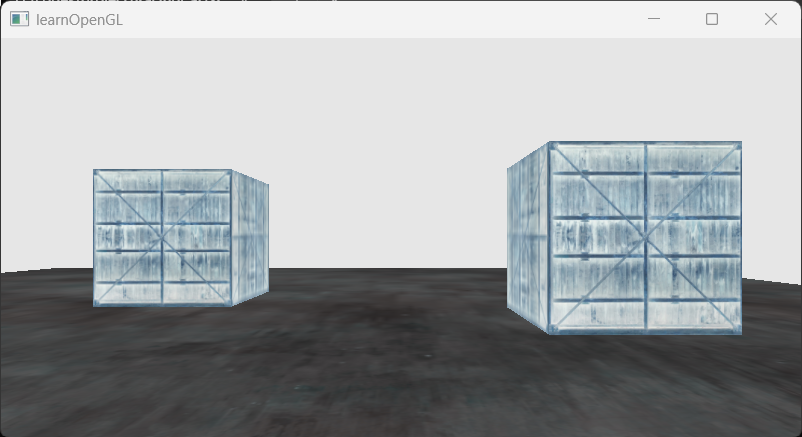
//screenFragmentShader#version 330 coreout vec4 FragColor;
in vec2 TexCoords;
uniform sampler2D screenTexture;
void main(){ vec3 col=texture(screenTexture,TexCoords).rgb; FragColor=vec4(1.0-col,1.0);}灰度化:
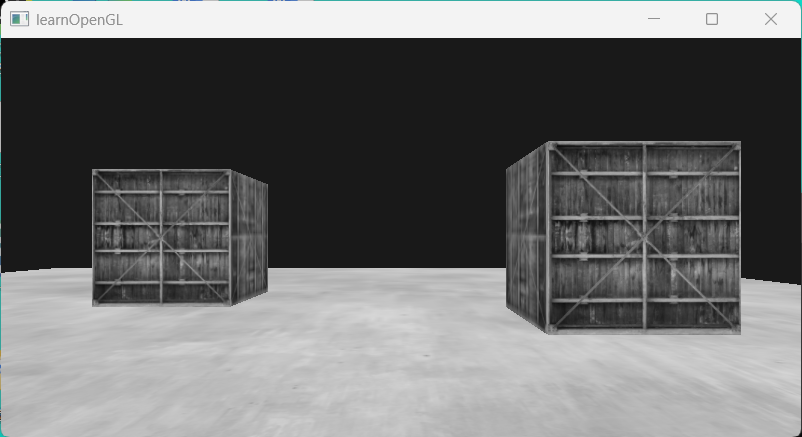
//screenFragmentShader#version 330 coreout vec4 FragColor;
in vec2 TexCoords;
uniform sampler2D screenTexture;
void main(){ vec3 col=texture(screenTexture,TexCoords).rgb; //计算灰度值 float average=0.2126*col.r+0.7152*col.g+0.0722*col.b; FragColor=vec4(average,average,average,1.0);}锐化:定义offsets数组,以及锐化卷积核。对当前像素,采样offsets数组中定义的周围的像素,分别乘以卷积核的值,得到当前像素的颜色输出。offset值越小,越靠近当前像素,提取出的边缘越细腻,画面越清晰;反之边缘越粗,画面越模糊。
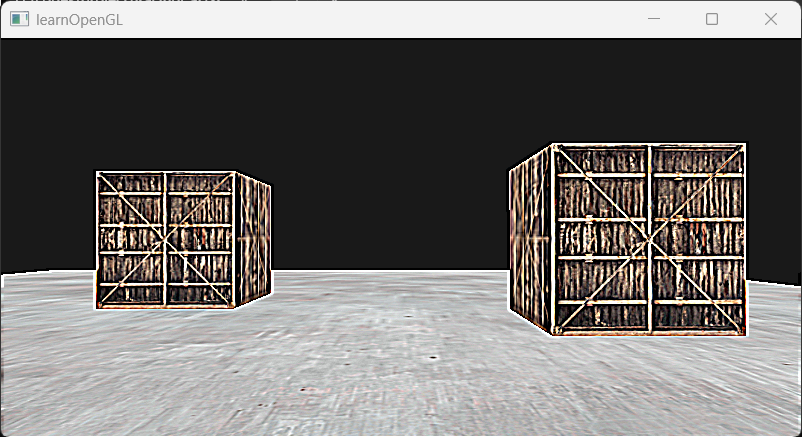
//screenFragmentShader#version 330 corein vec2 TexCoords;out vec4 FragColor;uniform sampler2D screenTexture;
const float offset=1.0/800.0;//元素类型 数组名[数组大小] = 数组构造器//数组构造器=元素类型[](...),...中每个元素的类型都必须是之前指定的类型,而且个数=数组大小vec2 offsets[9] = vec2[]( vec2(-offset,offset),//左上 vec2(0.0f,offset),//正上 vec2(offset,offset),//右上 vec2(-offset,0.0f),//左 vec2(0.0f,0.0f),//中 vec2(offset,0.0f),//右 vec2(-offset,-offset),//左下 vec2(0.0f,-offset),//正下 vec2(offset,-offset)//右下);float kernel[9]=float[]( -1,-1,-1, -1,9,-1, -1,-1,-1);void main(){ vec3 sampleTex[9]; for(int i=0;i<9;i++){ sampleTex[i]=texture(screenTexture,TexCoords+offsets[i]).rgb; } vec3 col=vec3(0.0); for(int i=0;i<9;i++){ col+=sampleTex[i]*kernel[i]; } FragColor=vec4(col,1.0);}模糊:修改上面代码中的卷积核,改为高斯滤波核,则可以得到高斯模糊的效果。卷积核的所有核值加起来等于1是为了保持图片的整体亮度不变。
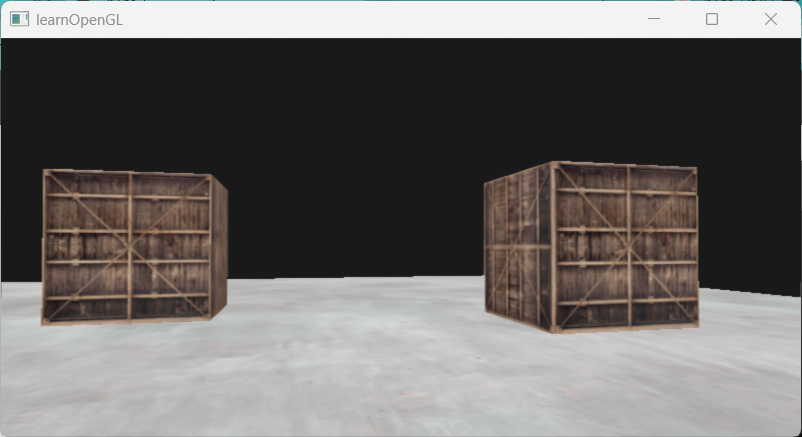
//screenFragmentShader#version 330 corein vec2 TexCoords;out vec4 FragColor;uniform sampler2D screenTexture;
const float offset=1.0/800.0;//元素类型 数组名[数组大小] = 数组构造器//数组构造器=元素类型[](...),...中每个元素的类型都必须是之前指定的类型,而且个数=数组大小vec2 offsets[9] = vec2[]( vec2(-offset,offset),//左上 vec2(0.0f,offset),//正上 vec2(offset,offset),//右上 vec2(-offset,0.0f),//左 vec2(0.0f,0.0f),//中 vec2(offset,0.0f),//右 vec2(-offset,-offset),//左下 vec2(0.0f,-offset),//正下 vec2(offset,-offset)//右下);float kernel[9]=float[]( 1.0/16,2.0/16,1.0/16, 2.0/16,4.0/16,2.0/16, 1.0/16,2.0/16,1.0/16);void main(){ vec3 sampleTex[9]; for(int i=0;i<9;i++){ sampleTex[i]=texture(screenTexture,TexCoords+offsets[i]).rgb; } vec3 col=vec3(0.0); for(int i=0;i<9;i++){ col+=sampleTex[i]*kernel[i]; } FragColor=vec4(col,1.0);}边缘提取:边缘提取的卷积核和锐化的很像,实则锐化就是原图+边缘提取。对边缘提取的卷积核,主要用于检测边缘,当处理一个平坦区域的像素时,它和周围像素的差异不大,所以它本身的像素值*8-周围八个像素值之和的结果近似为0,不会高亮;当处理一个边缘的像素时,它和周围像素的差异很大,所以卷积核处理之后不为0,会高亮。
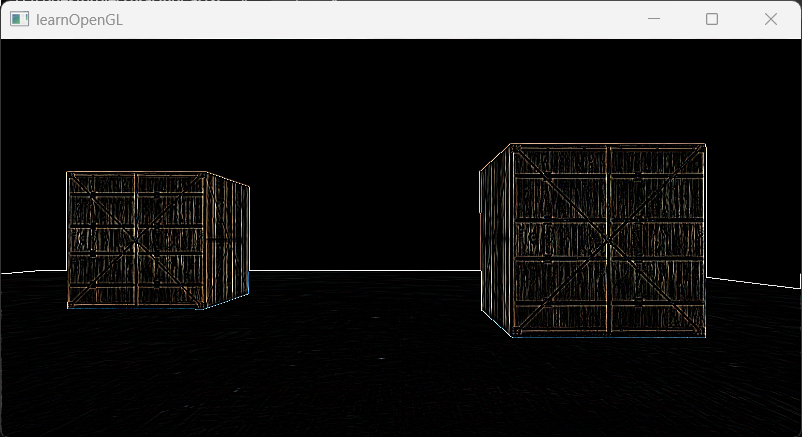
//screenFragmentShader#version 330 corein vec2 TexCoords;out vec4 FragColor;uniform sampler2D screenTexture;
const float offset=1.0/800.0;//元素类型 数组名[数组大小] = 数组构造器//数组构造器=元素类型[](...),...中每个元素的类型都必须是之前指定的类型,而且个数=数组大小vec2 offsets[9] = vec2[]( vec2(-offset,offset),//左上 vec2(0.0f,offset),//正上 vec2(offset,offset),//右上 vec2(-offset,0.0f),//左 vec2(0.0f,0.0f),//中 vec2(offset,0.0f),//右 vec2(-offset,-offset),//左下 vec2(0.0f,-offset),//正下 vec2(offset,-offset)//右下);float kernel[9]=float[]( 1.0,1.0,1.0, 1.0,-8.0,1.0, 1.0,1.0,1.0);void main(){ vec3 sampleTex[9]; for(int i=0;i<9;i++){ sampleTex[i]=texture(screenTexture,TexCoords+offsets[i]).rgb; } vec3 col=vec3(0.0); for(int i=0;i<9;i++){ col+=sampleTex[i]*kernel[i]; } FragColor=vec4(col,1.0);}homework
你能使用framebuffers创建一个后视镜吗?为此,你必须绘制两次场景:一次将相机旋转180度,另一次将相机正常旋转。试着在屏幕顶部创建一个小的四边形来应用镜像纹理.
思路:第一个pass绘制后视镜的图像,需要把相机向后旋转180度,这通过修改相机的yaw得到,在新的yaw下计算新的view,赋值给着色器,渲染到自定义帧缓冲中;第二个pass绘制正常场景,渲染到默认缓冲中,绘制完后,调用screenShader把自定义缓冲中的内容绘制到一个四边形面片。
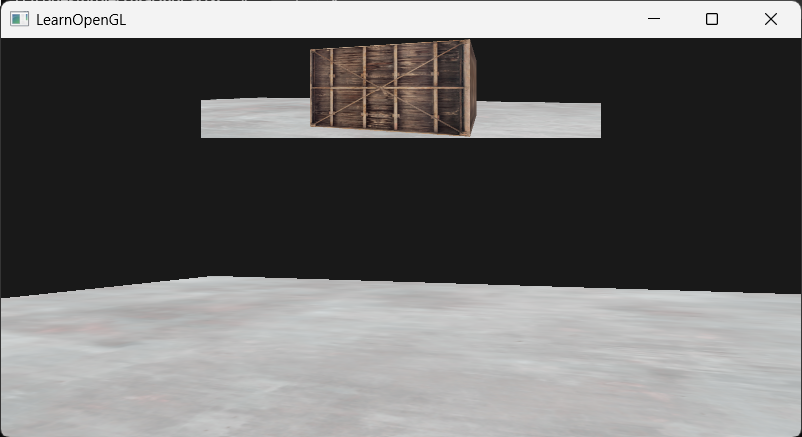
#define STB_IMAGE_IMPLEMENTATION#include <glad/glad.h>#include <GLFW/glfw3.h>
#include <glm/glm.hpp>#include <glm/gtc/matrix_transform.hpp>#include <glm/gtc/type_ptr.hpp>
#include <stb_image.h>#include <iostream>
#include <myShader.h>#include <myCamera.h>
using namespace std;
const unsigned int SCR_WIDTH = 800;const unsigned int SCR_HEIGHT = 400;
Camera camera(glm::vec3(0.0f, 0.0f, 3.0f));float lastX = (float)SCR_WIDTH / 2.0f;float lastY = (float)SCR_HEIGHT / 2.0f;float deltaTime = 0.0f;float lastFrame = 0.0f;bool firstCamera = true;
void framebuffer_size_callback(GLFWwindow* window, int width, int height) { glViewport(0, 0, width, height);}void processInput(GLFWwindow* window) { if(glfwGetKey(window,GLFW_KEY_ESCAPE)==GLFW_PRESS){ glfwSetWindowShouldClose(window, true); } if (glfwGetKey(window, GLFW_KEY_W) == GLFW_PRESS) { camera.ProcessKeyboard(FORWARD, deltaTime); } if (glfwGetKey(window, GLFW_KEY_S) == GLFW_PRESS) { camera.ProcessKeyboard(BACKWARD, deltaTime); } if (glfwGetKey(window, GLFW_KEY_A) == GLFW_PRESS) { camera.ProcessKeyboard(LEFT, deltaTime); } if (glfwGetKey(window, GLFW_KEY_D) == GLFW_PRESS) { camera.ProcessKeyboard(RIGHT, deltaTime); }}void processMovement(GLFWwindow* window, double xpos, double ypos) { if (firstCamera) { lastX = xpos; lastY = ypos; firstCamera = false; } float xoffset = xpos - lastX; float yoffset = lastY - ypos; lastX = xpos; lastY = ypos; camera.ProcessMouseMovement(xoffset, yoffset);}void processScroll(GLFWwindow* window, double xoffset, double yoffset) { camera.ProcessScroll(yoffset);}unsigned int loadTexture(const char* path) { unsigned int texture; glGenTextures(1, &texture); glBindTexture(GL_TEXTURE_2D, texture);
int width, height, nrChannels; unsigned char* data = stbi_load(path, &width, &height, &nrChannels, 0); if (data) { GLenum format; if (nrChannels == 1) { format = GL_RED; } else if (nrChannels == 3) { format = GL_RGB; } else if (nrChannels == 4) { format = GL_RGBA; } glTexImage2D(GL_TEXTURE_2D, 0, format, width, height, 0, format, GL_UNSIGNED_BYTE, data); glGenerateMipmap(GL_TEXTURE_2D); glTexParameteri(GL_TEXTURE_2D, GL_TEXTURE_WRAP_S, GL_REPEAT); glTexParameteri(GL_TEXTURE_2D, GL_TEXTURE_WRAP_T, GL_REPEAT); glTexParameteri(GL_TEXTURE_2D, GL_TEXTURE_MIN_FILTER, GL_LINEAR_MIPMAP_LINEAR); glTexParameteri(GL_TEXTURE_2D, GL_TEXTURE_MAG_FILTER, GL_LINEAR); } else { cout << "Failed to load texture" << endl; } stbi_image_free(data); return texture;}int main() { glfwInit(); glfwWindowHint(GLFW_CONTEXT_VERSION_MAJOR, 3); glfwWindowHint(GLFW_CONTEXT_VERSION_MINOR, 3); glfwWindowHint(GLFW_OPENGL_PROFILE, GLFW_OPENGL_CORE_PROFILE);
GLFWwindow* window = glfwCreateWindow(SCR_WIDTH, SCR_HEIGHT, "LearnOpenGL", NULL, NULL); if (window == NULL) { cout << "Failed to initialize GLFW" << endl; glfwTerminate(); return -1; } glfwMakeContextCurrent(window); glfwSetFramebufferSizeCallback(window, framebuffer_size_callback); glfwSetScrollCallback(window, processScroll); glfwSetCursorPosCallback(window, processMovement);
if (!gladLoadGLLoader((GLADloadproc)glfwGetProcAddress)) { cout << "failed to load glad" << endl; glfwTerminate(); return -1; }
glfwSetInputMode(window, GLFW_CURSOR, GLFW_CURSOR_DISABLED);
stbi_set_flip_vertically_on_load(true);
glEnable(GL_DEPTH_TEST);
float cubeVertices[] = { // positions // texture Coords -0.5f, -0.5f, -0.5f, 0.0f, 0.0f, 0.5f, -0.5f, -0.5f, 1.0f, 0.0f, 0.5f, 0.5f, -0.5f, 1.0f, 1.0f, 0.5f, 0.5f, -0.5f, 1.0f, 1.0f, -0.5f, 0.5f, -0.5f, 0.0f, 1.0f, -0.5f, -0.5f, -0.5f, 0.0f, 0.0f,
-0.5f, -0.5f, 0.5f, 0.0f, 0.0f, 0.5f, -0.5f, 0.5f, 1.0f, 0.0f, 0.5f, 0.5f, 0.5f, 1.0f, 1.0f, 0.5f, 0.5f, 0.5f, 1.0f, 1.0f, -0.5f, 0.5f, 0.5f, 0.0f, 1.0f, -0.5f, -0.5f, 0.5f, 0.0f, 0.0f,
-0.5f, 0.5f, 0.5f, 1.0f, 0.0f, -0.5f, 0.5f, -0.5f, 1.0f, 1.0f, -0.5f, -0.5f, -0.5f, 0.0f, 1.0f, -0.5f, -0.5f, -0.5f, 0.0f, 1.0f, -0.5f, -0.5f, 0.5f, 0.0f, 0.0f, -0.5f, 0.5f, 0.5f, 1.0f, 0.0f,
0.5f, 0.5f, 0.5f, 1.0f, 0.0f, 0.5f, 0.5f, -0.5f, 1.0f, 1.0f, 0.5f, -0.5f, -0.5f, 0.0f, 1.0f, 0.5f, -0.5f, -0.5f, 0.0f, 1.0f, 0.5f, -0.5f, 0.5f, 0.0f, 0.0f, 0.5f, 0.5f, 0.5f, 1.0f, 0.0f,
-0.5f, -0.5f, -0.5f, 0.0f, 1.0f, 0.5f, -0.5f, -0.5f, 1.0f, 1.0f, 0.5f, -0.5f, 0.5f, 1.0f, 0.0f, 0.5f, -0.5f, 0.5f, 1.0f, 0.0f, -0.5f, -0.5f, 0.5f, 0.0f, 0.0f, -0.5f, -0.5f, -0.5f, 0.0f, 1.0f,
-0.5f, 0.5f, -0.5f, 0.0f, 1.0f, 0.5f, 0.5f, -0.5f, 1.0f, 1.0f, 0.5f, 0.5f, 0.5f, 1.0f, 0.0f, 0.5f, 0.5f, 0.5f, 1.0f, 0.0f, -0.5f, 0.5f, 0.5f, 0.0f, 0.0f, -0.5f, 0.5f, -0.5f, 0.0f, 1.0f };
float planeVertices[] = { 5.0f, -0.5f, 5.0f, 2.0f, 0.0f, -5.0f, -0.5f, 5.0f, 0.0f, 0.0f, -5.0f, -0.5f, -5.0f, 0.0f, 2.0f,
5.0f, -0.5f, 5.0f, 2.0f, 0.0f, -5.0f, -0.5f, -5.0f, 0.0f, 2.0f, 5.0f, -0.5f, -5.0f, 2.0f, 2.0f };
//后视镜对应的面片,仅占据屏幕一部分 float quadVertices[] = { // positions // texCoords -0.5f, 1.0f, 0.0f, 1.0f,//左上 -0.5f, 0.5f, 0.0f, 0.0f,//左下 0.5f, 0.5f, 1.0f, 0.0f,//右下
-0.5f, 1.0f, 0.0f, 1.0f,//左上 0.5f, 0.5f, 1.0f, 0.0f,//右下 0.5f, 1.0f, 1.0f, 1.0f };
unsigned int cubeVAO, cubeVBO; glGenVertexArrays(1, &cubeVAO); glGenBuffers(1, &cubeVBO); glBindVertexArray(cubeVAO); glBindBuffer(GL_ARRAY_BUFFER,cubeVBO); glBufferData(GL_ARRAY_BUFFER, sizeof(cubeVertices), cubeVertices, GL_STATIC_DRAW); glVertexAttribPointer(0, 3, GL_FLOAT, GL_FALSE, 5 * sizeof(float), (void*)0); glEnableVertexAttribArray(0); glVertexAttribPointer(1, 2, GL_FLOAT, GL_FALSE, 5 * sizeof(float), (void*)(3*sizeof(float))); glEnableVertexAttribArray(1); glBindVertexArray(0);
unsigned int planeVAO, planeVBO; glGenVertexArrays(1, &planeVAO); glGenBuffers(1, &planeVBO); glBindVertexArray(planeVAO); glBindBuffer(GL_ARRAY_BUFFER, planeVBO); glBufferData(GL_ARRAY_BUFFER, sizeof(planeVertices), planeVertices, GL_STATIC_DRAW); glVertexAttribPointer(0, 3, GL_FLOAT, GL_FALSE, 5 * sizeof(float), (void*)0); glEnableVertexAttribArray(0); glVertexAttribPointer(1, 2, GL_FLOAT, GL_FALSE, 5 * sizeof(float), (void*)(3 * sizeof(float))); glEnableVertexAttribArray(1); glBindVertexArray(0);
unsigned int quadVAO, quadVBO; glGenVertexArrays(1, &quadVAO); glGenBuffers(1, &quadVBO); glBindVertexArray(quadVAO); glBindBuffer(GL_ARRAY_BUFFER, quadVBO); glBufferData(GL_ARRAY_BUFFER, sizeof(quadVertices), quadVertices, GL_STATIC_DRAW); glVertexAttribPointer(0, 2, GL_FLOAT, GL_FALSE, 4 * sizeof(float), (void*)0); glEnableVertexAttribArray(0); glVertexAttribPointer(1, 2, GL_FLOAT, GL_FALSE, 4 * sizeof(float), (void*)(2 * sizeof(float))); glEnableVertexAttribArray(1); glBindVertexArray(0);
unsigned int framebuffer; glGenFramebuffers(1, &framebuffer); glBindFramebuffer(GL_FRAMEBUFFER, framebuffer);
unsigned int textureColorbuffer; glGenTextures(1, &textureColorbuffer); glBindTexture(GL_TEXTURE_2D, textureColorbuffer); glTexImage2D(GL_TEXTURE_2D, 0, GL_RGB, SCR_WIDTH, SCR_HEIGHT, 0, GL_RGB, GL_UNSIGNED_BYTE, NULL); glTexParameteri(GL_TEXTURE_2D, GL_TEXTURE_MIN_FILTER, GL_LINEAR); glTexParameteri(GL_TEXTURE_2D, GL_TEXTURE_MAG_FILTER, GL_LINEAR); glFramebufferTexture2D(GL_FRAMEBUFFER, GL_COLOR_ATTACHMENT0, GL_TEXTURE_2D, textureColorbuffer, 0);
unsigned int rbo; glGenRenderbuffers(1, &rbo); glBindRenderbuffer(GL_RENDERBUFFER, rbo); glRenderbufferStorage(GL_RENDERBUFFER, GL_DEPTH24_STENCIL8, SCR_WIDTH, SCR_HEIGHT); glFramebufferRenderbuffer(GL_FRAMEBUFFER, GL_DEPTH_STENCIL_ATTACHMENT, GL_RENDERBUFFER, rbo);
if (glCheckFramebufferStatus(GL_FRAMEBUFFER) != GL_FRAMEBUFFER_COMPLETE) { cout << "ERROR::FRAMEBUFFER:IMCOMPLETE!" << endl; } glBindFramebuffer(GL_FRAMEBUFFER, 0);
Shader shader("src/Shader/vertexShader.txt", "src/Shader/fragmentShader.txt"); Shader screenShader("src/Shader/screenVertexShader.txt", "src/Shader/screenFragmentShader.txt");
unsigned int texture1 = loadTexture("resources/textures/container.jpg"); unsigned int texture2 = loadTexture("resources/textures/metal.jpg");
shader.use(); shader.setInt("texture1", 0); shader.setInt("texture2", 1);
screenShader.use(); screenShader.setInt("screenTexture", 0);
while (!glfwWindowShouldClose(window)) { float currentFrame = (float)glfwGetTime(); deltaTime = currentFrame - lastFrame; lastFrame = currentFrame;
processInput(window);
//first pass:绘制后视镜画面 glBindFramebuffer(GL_FRAMEBUFFER,framebuffer); glEnable(GL_DEPTH_TEST); glClearColor(0.1, 0.1, 0.1, 1.0); glClear(GL_COLOR_BUFFER_BIT | GL_DEPTH_BUFFER_BIT);
shader.use(); glm::mat4 model = glm::mat4(1.0f); //实现相机看向身后 camera.Yaw += 180.0f; camera.ProcessMouseMovement(0, 0, false);//根据新的Yaw,更新right和front,以便得到正确的lookAt glm::mat4 view = camera.GetCameraView(); camera.Yaw -= 180.0f; camera.ProcessMouseMovement(0, 0, true);//还原lookAt shader.setMatrix("view", view); glm::mat4 project; project = glm::perspective(glm::radians(camera.Zoom), (float)SCR_WIDTH / (float)SCR_HEIGHT, 0.1f, 100.0f); shader.setMatrix("project", project);
glBindVertexArray(cubeVAO); glActiveTexture(GL_TEXTURE0); glBindTexture(GL_TEXTURE_2D, texture1); shader.setInt("useTex", 1); model = glm::translate(model, glm::vec3(-1.0f, 0.0f, -1.0f)); shader.setMatrix("model", model); glDrawArrays(GL_TRIANGLES, 0, 36); glBindVertexArray(0);
glBindVertexArray(cubeVAO); model = glm::mat4(1.0); model = glm::translate(model, glm::vec3(2.0f, 0.0f, 0.0f)); shader.setMatrix("model", model); glDrawArrays(GL_TRIANGLES, 0, 36); glBindVertexArray(0);
glBindVertexArray(planeVAO); glActiveTexture(GL_TEXTURE1); glBindTexture(GL_TEXTURE_2D, texture2); shader.setInt("useTex", 2); model = glm::mat4(1.0); shader.setMatrix("model", model); shader.setMatrix("view", view); shader.setMatrix("project", project); glDrawArrays(GL_TRIANGLES, 0, 6); glBindVertexArray(0);
//second pass:绘制正常场景 glBindFramebuffer(GL_FRAMEBUFFER, 0); glClearColor(0.1, 0.1, 0.1, 1.0); glClear(GL_COLOR_BUFFER_BIT | GL_DEPTH_BUFFER_BIT); model = glm::mat4(1.0f); view = camera.GetCameraView(); shader.setMatrix("view", view); shader.setMatrix("project", project);
glBindVertexArray(cubeVAO); glActiveTexture(GL_TEXTURE0); glBindTexture(GL_TEXTURE_2D, texture1); shader.setInt("useTex", 1); model = glm::translate(model, glm::vec3(-1.0f, 0.0f, -1.0f)); shader.setMatrix("model", model); glDrawArrays(GL_TRIANGLES, 0, 36);
model = glm::mat4(1.0f); model = glm::translate(model, glm::vec3(2.0f, 0.0f, 0.0f)); shader.setMatrix("model", model); glDrawArrays(GL_TRIANGLES, 0, 36); glBindVertexArray(0);
glBindVertexArray(planeVAO); glActiveTexture(GL_TEXTURE1); glBindTexture(GL_TEXTURE_2D, texture2); shader.setInt("useTex", 2); model = glm::mat4(1.0); shader.setMatrix("model", model); shader.setMatrix("view", view); shader.setMatrix("project", project); glDrawArrays(GL_TRIANGLES, 0, 6); glBindVertexArray(0);
//把后视镜画面绘制到屏幕中 glDisable(GL_DEPTH_TEST);//四边形需要盖住已经存在的屏幕画面 screenShader.use(); glBindVertexArray(quadVAO); glActiveTexture(GL_TEXTURE0); glBindTexture(GL_TEXTURE_2D, textureColorbuffer); glDrawArrays(GL_TRIANGLES, 0, 6); glBindVertexArray(0);
glfwSwapBuffers(window); glfwPollEvents(); } glDeleteVertexArrays(1, &cubeVAO); glDeleteVertexArrays(1, &planeVAO); glDeleteVertexArrays(1, &quadVAO); glDeleteBuffers(1, &cubeVBO); glDeleteBuffers(1, &planeVBO); glDeleteBuffers(1, &quadVBO); glDeleteFramebuffers(1, &framebuffer);
glfwTerminate(); return 0;}