深度缓冲基本属性
- 深度缓冲与颜色缓冲宽、高完全一致,一一对应每个屏幕像素。
- 深度缓冲由窗口系统自动创建,无需手动开辟显存。
- 深度精度分为:16bit、24bit、32bit,项目最常用 24bit。
深度测试执行时机与 gl_FragCoord
执行顺序
完整渲染顺序:片元着色器运行之后 → 模板测试之后 → 深度测试(屏幕空间)
gl_FragCoord 内置变量
可在片元着色器中读取片元屏幕空间信息:
- x、y 分量:屏幕像素坐标,屏幕左下角为原点。
- z 分量:该片元真实的屏幕空间深度值,用于和深度缓冲数据比对、判断遮挡。
Early-Z 提前深度测试
- 执行时机:在片元着色器执行之前提前完成深度测试。
- 作用:提前剔除被遮挡片元,跳过片元着色器计算,大幅提升性能。
- 限制:开启 Early-Z 的前提下,片元着色器不能修改片元深度值。一旦手动修改深度,Early-Z 预判失效,硬件会自动关闭提前测试。
深度测试常用核心指令
// 开启深度测试(默认关闭)glEnable(GL_DEPTH_TEST);
// 清空深度缓冲(每一帧渲染前必须执行)glClear(GL_DEPTH_BUFFER_BIT);
// 深度缓冲只读:只测试不写入,常用于UI、透明物体glDepthMask(GL_FALSE);
// 设置深度测试比较函数(常用:小于当前深度则通过)glDepthFunc(GL_LESS);深度值完整变换流水线
深度变换流程
相机空间Z → 透视投影矩阵 → 裁剪空间Z → 透视除法 → NDC空间Z → 归一化映射 → 屏幕空间Z(写入深度缓冲)
各空间 Z 值范围
- 相机空间、裁剪空间:
[-far, -near] - NDC 空间:
[-1, 1] - 屏幕空间/深度缓冲存储值:
[0, 1]
非线性深度
透视除法会引入非线性关系:
- NDC 的 Z 和 相机空间 Z 不再是正比关系。
- 近处深度精度极高:近处微小空间占用大量 0~1 深度区间。
- 远处深度精度极低:远距离大范围空间被压缩到极小深度区间。 优势:优先保证近处物体的深度精度,高效利用有限的深度缓冲位数。
深度值可视化
深度缓冲中存储的深度值越接近 1.0,可视化颜色越白;越接近 0.0 越黑。
Z-fighting
产生原因
两个平面/三角面几乎平行且紧贴重合,深度缓冲精度不足以区分前后顺序,导致每一帧随机穿插闪烁、出现斑驳花纹。 远处物体更严重:远处深度精度本身极低,极容易出现深度冲突。
解决办法
- 拉开偏移距离:给重叠物体设置肉眼不可察的微小空间偏移,彻底避免 Z 值重合,需逐场景测试微调。
- 适当拉远近平面:深度精度主要集中在近平面附近,拉远近平面可整体提升视锥体全域精度;但不能过远,否则近处物体被裁剪。
- 使用更高精度深度缓冲:舍弃部分性能,将默认
24bit深度缓冲提升为32bit,大幅缓解精度不足问题。
example1: 深度测试函数对深度测试的影响
搭建一个简单的场景用于测试深度测试,包括带纹理的两个立方体箱子和一个平面。教程中的代码虽然加载了两张纹理,但是在绘制时仅使用了一张纹理,并没有给平面绑定上纹理,片元着色器中也是只采样了一张纹理,所以三个物体都共用一张纹理。我对此进行了修改,首先是片元着色器中定义了第二张纹理对应的uniform变量,并使用一个int型的开关变量标识当前绘制的是哪个物体,控制开启哪一张纹理。然后在main.cpp中,将两个uniform变量都赋好值,在渲染循环中,绘制箱子时,激活第一个纹理单元,绑定第一张纹理,然后设置开关变量值;绘制平面时,激活第二个纹理单元,绑定第二张纹理,同样设置开关变量值。
之后由于粗心,在加载纹理时,未绑定就设置了纹理的参数,包括glTexImage(传递纹理)、glGenerateMipmap(生成mipmap)以及glTexParameteri等属性设置。导致平面纹理没有加载成功,渲染出来是黑色。
#define STB_IMAGE_IMPLEMENTATION#include <glad/glad.h>#include <GLFW/glfw3.h>#include <stb_image.h>
#include <glm/glm.hpp>#include <glm/gtc/matrix_transform.hpp>#include <glm/gtc/type_ptr.hpp>
#include <myShader.h>#include <myCamera.h>#include <Model.h>
#include <iostream>
const unsigned int SCR_WIDTH = 800;const unsigned int SCR_HEIGHT = 400;
Camera camera(glm::vec3(0.0f, 0.0f, 3.0f));float lastX = (float)SCR_WIDTH / 2.0;float lastY = (float)SCR_HEIGHT / 2.0;bool firstCamera = true;
float deltaTime = 0.0f;float lastFrame = 0.0f;
void framebuffer_size_callback(GLFWwindow* window, int width, int height) { glViewport(0, 0, width, height);}void processInput(GLFWwindow* window) { if (glfwGetKey(window, GLFW_KEY_ESCAPE)) { glfwSetWindowShouldClose(window, true); } if (glfwGetKey(window, GLFW_KEY_W)) { camera.ProcessKeyboard(FORWARD, deltaTime); } if (glfwGetKey(window, GLFW_KEY_S)) { camera.ProcessKeyboard(BACKWARD, deltaTime); } if (glfwGetKey(window, GLFW_KEY_A)) { camera.ProcessKeyboard(LEFT, deltaTime); } if (glfwGetKey(window, GLFW_KEY_D)) { camera.ProcessKeyboard(RIGHT, deltaTime); }}void processMovement(GLFWwindow* window, double xpos, double ypos) { if (firstCamera) { lastX = static_cast<float>(xpos); lastY = static_cast<float>(ypos); firstCamera = false; } float xoffset = static_cast<float>(xpos) - lastX; float yoffset = lastY - static_cast<float>(ypos); lastX = static_cast<float>(xpos); lastY = static_cast<float>(ypos); camera.ProcessMouseMovement(xoffset, yoffset);}void processScroll(GLFWwindow* window, double xoffset, double yoffset) { camera.ProcessScroll(static_cast<float>(yoffset));}unsigned int loadTexture(const char* path) { unsigned int texture; glGenTextures(1, &texture);
int width, height, nrChannels; unsigned char* data = stbi_load(path, &width, &height, &nrChannels, 0); if (data) { GLenum format; if (nrChannels == 1) { format = GL_RED; } else if (nrChannels == 3) { format = GL_RGB; } else if (nrChannels == 4) { format = GL_RGBA; } glBindTexture(GL_TEXTURE_2D, texture);
glTexImage2D(GL_TEXTURE_2D, 0, format, width, height, 0, format, GL_UNSIGNED_BYTE, data); glGenerateMipmap(GL_TEXTURE_2D);
glTexParameteri(GL_TEXTURE_2D, GL_TEXTURE_WRAP_S, GL_REPEAT); glTexParameteri(GL_TEXTURE_2D, GL_TEXTURE_WRAP_T, GL_REPEAT); glTexParameteri(GL_TEXTURE_2D, GL_TEXTURE_MIN_FILTER, GL_LINEAR_MIPMAP_LINEAR); glTexParameteri(GL_TEXTURE_2D, GL_TEXTURE_MAG_FILTER, GL_LINEAR); } else { cout << "failed to load tetxure" << endl; } stbi_image_free(data);
return texture;}int main() { glfwInit(); glfwWindowHint(GLFW_CONTEXT_VERSION_MAJOR, 3); glfwWindowHint(GLFW_CONTEXT_VERSION_MINOR, 3); glfwWindowHint(GLFW_OPENGL_PROFILE, GLFW_OPENGL_CORE_PROFILE);
GLFWwindow* window = glfwCreateWindow(SCR_WIDTH, SCR_HEIGHT, "learnOpenGL", NULL, NULL);
if (window == NULL) { cout << "failed to create GLFW window" << endl; glfwTerminate(); return -1; }
glfwMakeContextCurrent(window); glfwSetFramebufferSizeCallback(window, framebuffer_size_callback); glfwSetCursorPosCallback(window, processMovement); glfwSetScrollCallback(window, processScroll);
glfwSetInputMode(window, GLFW_CURSOR, GLFW_CURSOR_DISABLED);
if (!gladLoadGLLoader(GLADloadproc(glfwGetProcAddress))) { cout << "failed to initialize glad" << endl; glfwTerminate(); return -1; }
stbi_set_flip_vertically_on_load(true);
glEnable(GL_DEPTH_TEST); glDepthFunc(GL_LESS);
Shader shader("src/Shader/vertexShader.txt", "src/Shader/fragmentShader.txt");
float cubeVertices[] = { -0.5f, -0.5f, -0.5f, 0.0f, 0.0f, 0.5f, -0.5f, -0.5f, 1.0f, 0.0f, 0.5f, 0.5f, -0.5f, 1.0f, 1.0f, 0.5f, 0.5f, -0.5f, 1.0f, 1.0f, -0.5f, 0.5f, -0.5f, 0.0f, 1.0f, -0.5f, -0.5f, -0.5f, 0.0f, 0.0f,
-0.5f, -0.5f, 0.5f, 0.0f, 0.0f, 0.5f, -0.5f, 0.5f, 1.0f, 0.0f, 0.5f, 0.5f, 0.5f, 1.0f, 1.0f, 0.5f, 0.5f, 0.5f, 1.0f, 1.0f, -0.5f, 0.5f, 0.5f, 0.0f, 1.0f, -0.5f, -0.5f, 0.5f, 0.0f, 0.0f,
-0.5f, 0.5f, 0.5f, 1.0f, 0.0f, -0.5f, 0.5f, -0.5f, 1.0f, 1.0f, -0.5f, -0.5f, -0.5f, 0.0f, 1.0f, -0.5f, -0.5f, -0.5f, 0.0f, 1.0f, -0.5f, -0.5f, 0.5f, 0.0f, 0.0f, -0.5f, 0.5f, 0.5f, 1.0f, 0.0f,
0.5f, 0.5f, 0.5f, 1.0f, 0.0f, 0.5f, 0.5f, -0.5f, 1.0f, 1.0f, 0.5f, -0.5f, -0.5f, 0.0f, 1.0f, 0.5f, -0.5f, -0.5f, 0.0f, 1.0f, 0.5f, -0.5f, 0.5f, 0.0f, 0.0f, 0.5f, 0.5f, 0.5f, 1.0f, 0.0f,
-0.5f, -0.5f, -0.5f, 0.0f, 1.0f, 0.5f, -0.5f, -0.5f, 1.0f, 1.0f, 0.5f, -0.5f, 0.5f, 1.0f, 0.0f, 0.5f, -0.5f, 0.5f, 1.0f, 0.0f, -0.5f, -0.5f, 0.5f, 0.0f, 0.0f, -0.5f, -0.5f, -0.5f, 0.0f, 1.0f,
-0.5f, 0.5f, -0.5f, 0.0f, 1.0f, 0.5f, 0.5f, -0.5f, 1.0f, 1.0f, 0.5f, 0.5f, 0.5f, 1.0f, 0.0f, 0.5f, 0.5f, 0.5f, 1.0f, 0.0f, -0.5f, 0.5f, 0.5f, 0.0f, 0.0f, -0.5f, 0.5f, -0.5f, 0.0f, 1.0f };
float planeVertices[] = { 5.0f, -0.5f, 5.0f, 2.0f, 0.0f, -5.0f, -0.5f, 5.0f, 0.0f, 0.0f, -5.0f, -0.5f, -5.0f, 0.0f, 2.0f,
5.0f, -0.5f, 5.0f, 2.0f, 0.0f, -5.0f, -0.5f, -5.0f, 0.0f, 2.0f, 5.0f, -0.5f, -5.0f, 2.0f, 2.0f };
unsigned int cubeVAO, cubeVBO; glGenVertexArrays(1, &cubeVAO); glGenBuffers(1, &cubeVBO);
glBindVertexArray(cubeVAO); glBindBuffer(GL_ARRAY_BUFFER,cubeVBO); glBufferData(GL_ARRAY_BUFFER, sizeof(cubeVertices), cubeVertices, GL_STATIC_DRAW);
glVertexAttribPointer(0, 3, GL_FLOAT, GL_FALSE, 5 * sizeof(float), (void*)0); glEnableVertexAttribArray(0);
glVertexAttribPointer(1, 2, GL_FLOAT, GL_FALSE, 5 * sizeof(float), (void*)(3 * sizeof(float))); glEnableVertexAttribArray(1);
glBindVertexArray(0);
unsigned int planeVAO, planeVBO; glGenVertexArrays(1, &planeVAO); glGenBuffers(1, &planeVBO);
glBindVertexArray(planeVAO); glBindBuffer(GL_ARRAY_BUFFER,planeVBO); glBufferData(GL_ARRAY_BUFFER, sizeof(planeVertices), planeVertices, GL_STATIC_DRAW);
glVertexAttribPointer(0, 3, GL_FLOAT, GL_FALSE, 5 * sizeof(float), (void*)0); glEnableVertexAttribArray(0);
glVertexAttribPointer(1, 2, GL_FLOAT, GL_FALSE, 5 * sizeof(float), (void*)(3 * sizeof(float))); glEnableVertexAttribArray(1);
glBindVertexArray(0);
unsigned int cubeTexture = loadTexture("resources/textures/marble.jpg"); unsigned int floorTexture = loadTexture("resources/textures/metal.jpg");
shader.use(); shader.setInt("texture1", 0); shader.setInt("texture2", 1);
while (!glfwWindowShouldClose(window)) { float currentFrame = (float)glfwGetTime(); deltaTime = currentFrame - lastFrame; lastFrame = currentFrame;
processInput(window);
glClearColor(0.1f, 0.1f, 0.1f, 1.0f); glClear(GL_COLOR_BUFFER_BIT | GL_DEPTH_BUFFER_BIT);
shader.use(); glm::mat4 model = glm::mat4(1.0f); glm::mat4 view = camera.GetCameraView(); glm::mat4 project = glm::perspective(glm::radians(camera.Zoom), (float)SCR_WIDTH / (float)SCR_HEIGHT, 0.1f, 100.0f); shader.setMatrix("view", view); shader.setMatrix("project", project);
glBindVertexArray(cubeVAO); glActiveTexture(GL_TEXTURE0); glBindTexture(GL_TEXTURE_2D, cubeTexture); shader.setInt("useFloorTex", 0); model = glm::translate(model, glm::vec3(-1.0f, 0.0f, -1.0f)); shader.setMatrix("model", model); glDrawArrays(GL_TRIANGLES, 0, 36);
model = glm::mat4(1.0f); model = glm::translate(model, glm::vec3(2.0f, 0.0f, 0.0f)); shader.setMatrix("model", model); glDrawArrays(GL_TRIANGLES, 0, 36);
glBindVertexArray(0);
glBindVertexArray(planeVAO); glActiveTexture(GL_TEXTURE1); glBindTexture(GL_TEXTURE_2D, floorTexture); shader.setInt("useFloorTex", 1); shader.setMatrix("model", glm::mat4(1.0f)); glDrawArrays(GL_TRIANGLES, 0, 6); glBindVertexArray(0);
glfwSwapBuffers(window); glfwPollEvents(); } glDeleteVertexArrays(1, &cubeVAO); glDeleteVertexArrays(1, &planeVAO); glDeleteBuffers(1, &cubeVBO); glDeleteBuffers(1, &planeVBO);
glfwTerminate(); return 0;}//vertexShader#version 330 corelayout (location = 0) in vec3 aPos;layout (location = 1) in vec2 aTexCoords;
out vec2 TexCoords;
uniform mat4 model;uniform mat4 view;uniform mat4 project;
void main(){ TexCoords=aTexCoords; gl_Position=project*view*model*vec4(aPos,1.0);}//fragmentShader#version 330 corein vec2 TexCoords;out vec4 FragColor;uniform sampler2D texture1;uniform sampler2D texture2;
uniform int useFloorTex;void main(){ if(useFloorTex==1){ FragColor=texture(texture2,TexCoords); }else{ FragColor=texture(texture1,TexCoords); }}深度测试函数默认是GL_LESS,可以通过glDepthFunc(xx)修改。
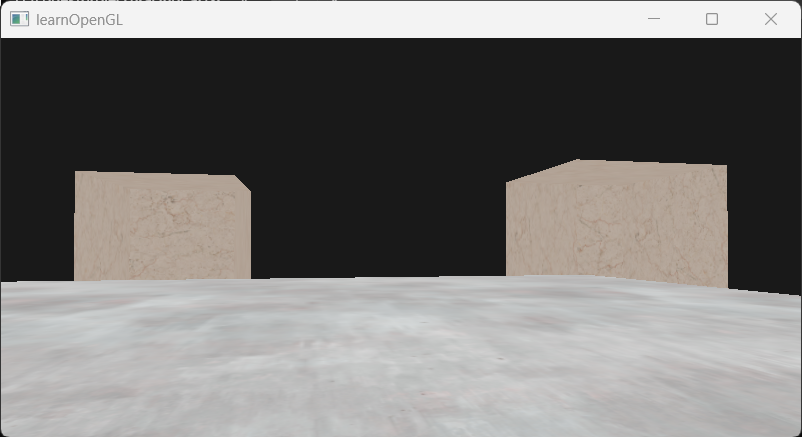
GL_LESS:
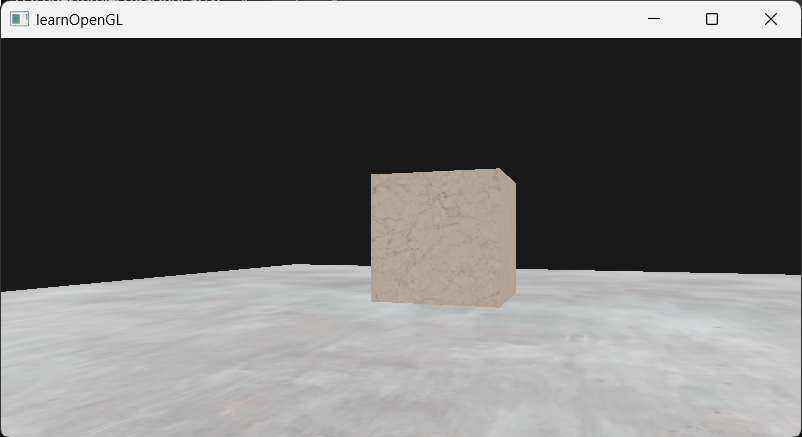 **GL_ALWAYS:**永远通过深度测试,那么最后绘制的片段会遮挡之前绘制的片段。下图中,最后绘制的地板会遮挡之前绘制的立方体箱子。
example2: 可视化深度缓冲
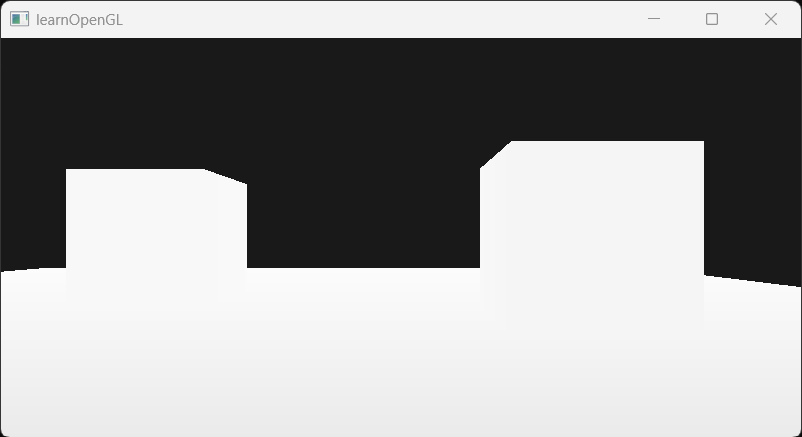
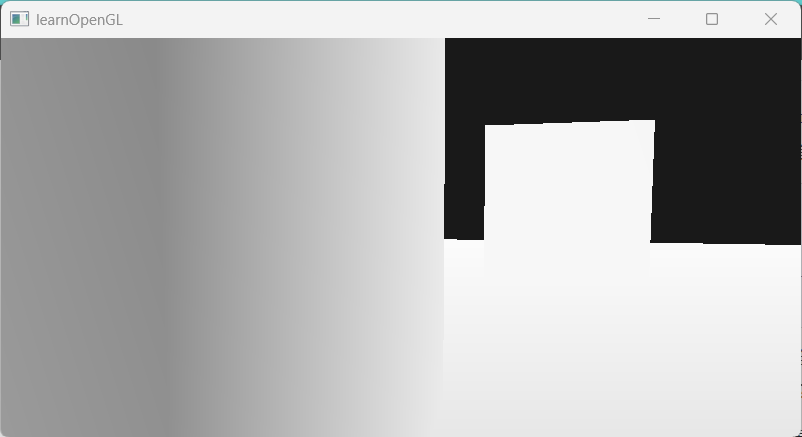
在片元着色器中通过gl_FragCoord访问每个片元的屏幕坐标,其z值为屏幕空间深度值。将这个值直接作为颜色输出。
//fragmentShader#version 330 corein vec2 TexCoords;out vec4 FragColor;uniform sampler2D texture1;uniform sampler2D texture2;
uniform int useFloorTex;void main(){ FragColor=vec4(vec3(gl_FragCoord.z),1.0);}刚渲染出来时,几乎所有物体都是白色的,即深度值非常大。当移动相机靠近其中一个物体,观察到近处区域开始变暗,且有渐变,但远处区域仍然全白。这很清楚地展示了深度值的非线性性质。近处的物体比起远处的物体对深度值有着更大的影响。只需要移动几厘米就能让颜色从暗完全变白。
example3: 线性化深度值
即把NDC空间的z值变换到相机空间下,需要逆归一化、逆投影变换以及透视除法。得到的相机空间深度值是[near,far]范围的,直接显示的话,大部分深度值都大于1,则画面全白。所以为了便于显示,除以far进行归一化到[0,1]。
//fragmentShader#version 330 corein vec2 TexCoords;out vec4 FragColor;uniform sampler2D texture1;uniform sampler2D texture2;
uniform int useFloorTex;
float near=0.1;float far=100.0;
float LinearizeDepth(float depth){ float z=depth*2.0-1.0; return (2.0*near*far) / (far+near-z*(far-near));}void main(){ //if(useFloorTex==1){ // FragColor=texture(texture2,TexCoords); //}else{ // FragColor=texture(texture1,TexCoords); //} float depth=LinearizeDepth(gl_FragCoord.z); FragColor=vec4(vec3(depth/far),1.0);}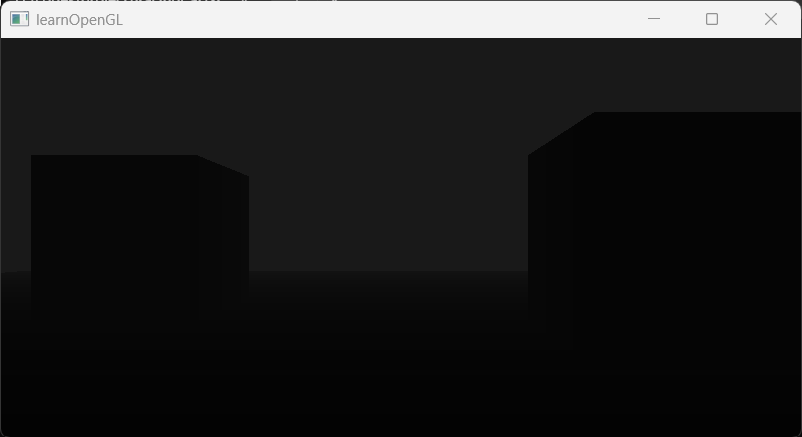 可以看到越接近远平面的区域越亮,越接近近平面的区域越暗。此外,画面很暗,这是因为线性深度值在
[0.1,100],归一化后在[0.001,1],距离相机10个单位以内的物体的深度值在[0.001,0.1]之间,而且场景中的物体都集中在这个区间,所以画面偏暗。
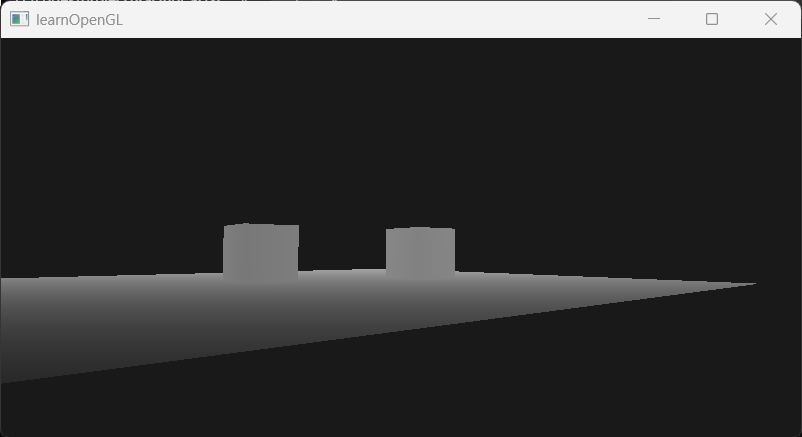
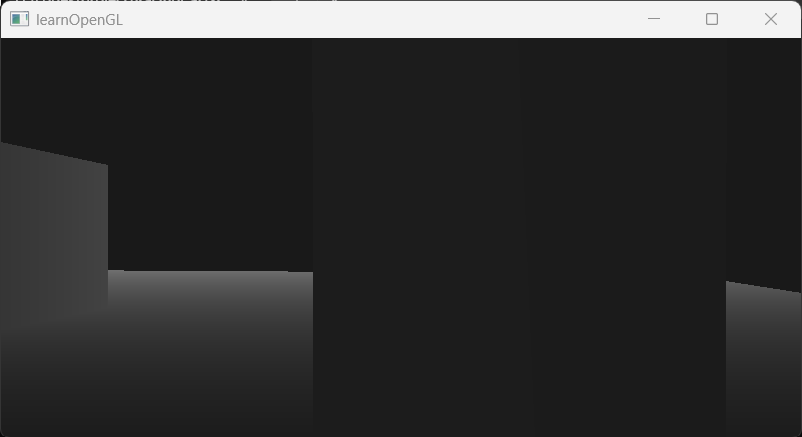
测试:将far改为10.0
当相机离物体较远->物体深度值较大->较亮
 当相机离物体较近->物体深度值较小->较暗
example4: 深度冲突
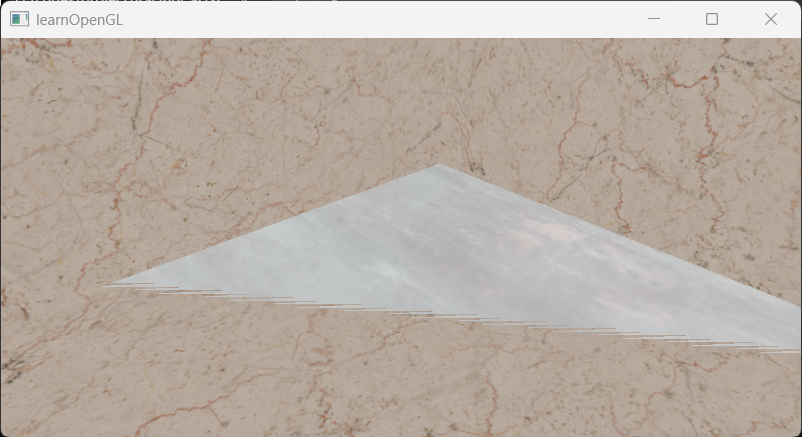
将相机移动到其中一个箱子的内部,观察底面,发现底面的纹理不断在平面纹理和箱子纹理之间切换,且有明显的锯齿状花纹。